If you’re an admin for a Torch coaching program and also a participant, follow these steps to switch between your two user profile views on the Torch platform.

After logging in to Torch, hover your cursor over the user profile icon in the top-right, then click Switch to Participant mode or Switch to Admin mode, depending on your current view.
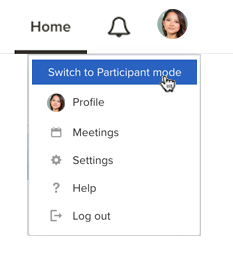

You’ll be directed to the Home dashboard for your participant or admin view accordingly.
NOTE: The next time you access Torch, you’ll get started in the same mode you left off in. For example, if you log out while in Admin mode, the next time you log in you will return back to your Admin view. |